> For the complete documentation index, see [llms.txt](https://docs.sharinpix.com/llms.txt). Markdown versions of documentation pages are available by appending `.md` to page URLs; this page is available as [Markdown](https://docs.sharinpix.com/forms/form-elements/sharinpix-form-formula-fields-and-attributes.md).
# SharinPix Form Formula: Fields and Attributes
### Overview
{% hint style="info" %}
The **SharinPix Form Formula Field** allows you to dynamically reference and manipulate data. Using formulas, you can combine static values with live data coming from form inputs and other sources to create flexible, data-driven form templates.
This article covers the following:
* [Accessing Form Fields](#overview)
* [Accessing Attributes of Form Fields](#accessing-attributes-of-form-fields)
{% endhint %}
{% hint style="success" %}
**Tips:**
[Follow this documentation](/forms/form-elements/sharinpix-form-formula-functions-and-operators.md) to learn more about the Functions and Operators available in a SharinPix Form Formula Field
{% endhint %}
### Getting Started
Formulas can reference data from the following sources:
1. **Current Form Fields:** Values entered by the end-user (e.g., `elementAPIName`).
2. **URL Parameters:** Data passed when launching the form via the `form.params.` prefix (e.g., `form.params.approval_threshold`).
### Accessing Form Fields
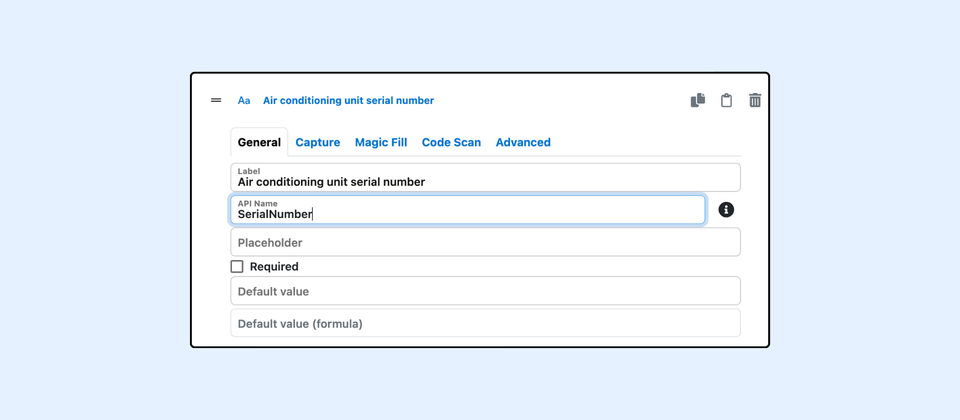
Any question with an API name can be used in a formula field. An API name can be added to a question using the *API Name field* on the form builder, as shown below.
The SerialNumber field can then be used in formula fields as shown above
{% hint style="danger" %}
A section or page cannot contain fields with the same API name.
{% endhint %}
#### Accessing nested fields
To access a nested field, i.e a field found inside a section, make sure to add an API name to the Section element as well. In the picture below the API name "Bedroom" is added to a Section element.
The "Bedroom" Section element contains a Radio question with the "ACWorking" API name as shown below.
To reference the "ACWorking" Radio question in a formula field found **outside** the "Bedroom" Section, it should be *prefixed* with the Section's API name as shown in the example below.
{% hint style="success" %}
**Tips:**
A field can be referenced without any prefix if it is being used in the same level (i.e, the section where it is found)
{% endhint %}
#### Accessing parent fields
The `parent` attribute is available for any question found in a section.
By using the `parent` attribute, we can access the attributes of the section as shown below.
{% hint style="success" %}
**Tips:**
You can use `.parent` to move up the elements tree and reference questions in other sections. For example:
`parent.parent.SiblingSection.ACWorking`
{% endhint %}
if you need to reference a **root-level (main page)** question inside a formula field for a question **nested** in a section, you can reference it by using the [**form**](#global-form-attributes) global field.
In the example below, the form includes a radio question with the API name `VisitType` on the main page, and a capture question inside the **Bedroom** section.
To reference `VisitType` from a formula on a question in the **Bedroom** section, use `form.VisitType`, as shown below.
### Accessing Attributes of Form Fields
A field can contain several attributes based on its type and they can be accessed by adding a "." following a field API name.
#### Generic Questions attributes
These attributes are available on almost all questions.
| Attribute | Purpose |
| ------------ | ------------------------------------------------------------------------------------------------------------------------------------------------------------------------------------- |
| value | Returns the current value of the field |
| displayValue | Returns the current value of the field as displayed on the UI |
| label | Returns the label of the question |
| media | Provides access to nested attributes containing information about the media associated with the question. |
| note | Returns the current note added to the question if any |
| reference | Return the previous value of the question in the context of a [follow-up form](/forms/advanced-form-configuration/form-features-initial-follow-up-form-responses-comparative-form.md) |
| visible | Returns whether the question is currently visible or not (This is available to use only if the question has a visibility formula configured) |
**displayValue attribute**
This attribute returns the current value of the field as shown on the UI.
For example, if a question has a label configured for a particular value, then that label will be returned in the formula as shown below.
For date questions it returns the date value as a formatted string, using the date format configured on the question.
**media attribute**
The `media` attribute provides access to nested attributes containing information about the media associated with the specified field.
| Attribute | Purpose |
| --------- | --------------------------------------------------------------------------------------------------- |
| count | Returns the number of media items associated with the field. |
| firstUrl | Returns a special object that references the URL of the first media item associated with the field. |
| lastUrl | Returns a special object that references the URL of the last media item associated with the field. |
{% hint style="warning" %}
**Note:** The `firstUrl` and `lastUrl` attributes are currently supported only when configuring a [**dynamic background for the Sketch component**](/forms/form-elements/form-features-sketch-component-with-dynamic-background.md).
{% endhint %}
{% hint style="warning" %}
**Note:** The `firstUrl` and `lastUrl` attributes always return a value, even when no media is associated with the field. They should therefore not be used to determine whether media exists. Use the `count` attribute instead.
{% endhint %}
#### Section Attributes
These attributes are only available to sections.
| Attribute | Purpose |
| ---------------------- | --------------------------------------------------------------------------- |
| \_questionsCount | Returns the number of visible questions that are inside the section |
| \_questionsFilledCount | Returns the number of visible questions that have filled inside the section |
| index | Returns the index of the section if it a repeated section |
The API names of the questions inside the Section are also attributes of the Section.
If a Section is a Repeated Section, it will also have the `index` attribute, which returns its position in the Repeated element as shown below.
### Repeated Sections attributes
These attributes are only available to the Repeated Sections element.
| Attribute | Purpose |
| --------- | ------------------------------------------------ |
| size | Returns the number of sections added by the user |
The nested fields of the repeated sections can also be referenced. Follow [this documentation](/forms/form-sections-and-repeated-sections/sharinpix-form-formula-referencing-repeated-section-fields.md) to learn more.
#### Global form attributes
There are several global attributes that can be accessed by using the `form` keyword
| Attribute | Purpose |
| --------- | ------------------------------------------------------------------------------------------------------------------------------------------------------------------------------------------------------------------------------- |
| compare | Returns `true` when the form being filled is a follow-up form. |
| params | Allows accessing the url params found in the url that was used to load the form. Follow [this documentation](/forms/advanced-form-configuration/sharinpix-forms-context-parameters.md) to learn more about this attribute. |
| response | Returns details of the SharinPix Form Response record. This can be used to show additional details on the [SharinPix Form PDF](/forms/form-pdf-configuration/sharinpix-forms-pdf-configuration.md). |
| template | Returns details of the SharinPix Form Template record. |
| view | Returns `"print"` in the context of pdf. This is useful for hiding or show specific fields on the [SharinPix Form PDF](/forms/form-pdf-configuration/sharinpix-forms-pdf-configuration.md). |
**response attribute**
This attribute of the `form` global field contains nested attributes about a SharinPix Form Response record created by the form.
| Attribute | Purpose |
| --------- | ------------------------------------------------------ |
| sfid | The Salesforce Record ID linked to the form response |
| sfname | The Salesforce Record Name linked to the form response |
**template attribute**
This attribute of the `form` global field contains nested attributes about the SharinPix Form Template record.
| Attribute | Purpose |
| --------- | ---------------------- |
| sfid | The Form Template ID |
| sfname | The Form Template Name |
**Root-level fields**
The questions found on the main page can also be referenced directly by using the `form` field as shown below.
{% hint style="success" %}
**Tips:**
This can be used to reference a root-level question from a nested formula field.
{% endhint %}
---
# Agent Instructions
This documentation is published with GitBook. GitBook is the documentation platform designed so that both humans and AI agents can read, navigate, and reason over technical content effectively. Learn more at gitbook.com.
## Querying This Documentation
If you need additional information that is not directly available in this page, you can query the documentation by asking a question.
Perform an HTTP GET request on the following URL with the `ask` and `goal` query parameters:
```
GET https://docs.sharinpix.com/forms/form-elements/sharinpix-form-formula-fields-and-attributes.md?ask=&goal=
```
`ask` is the immediate question: it should be specific, self-contained, and written in natural language.
`goal` is what the user is ultimately trying to achieve, the reason they need the answer. Sharing it helps GitBook give you a better, more relevant answer. A goal is most helpful when it describes the outcome the user wants rather than restating the question. For example, with `ask=how do I create an API token`, a goal like `automate deployments from our CI pipeline` lets GitBook tailor the answer to that use case.
The response will contain a direct answer to the question and relevant excerpts and sources from the documentation.
Use this mechanism when the answer is not explicitly present in the current page, you need clarification or additional context, or you want to retrieve related documentation sections.


.png?alt=media&token=14dd54aa-d6e4-4ddb-8697-77f0c1b5fbae)
.png?alt=media&token=de419615-5db7-4b51-ad2b-b697bb43a30b)
.png?alt=media&token=2896d1ef-1e69-4ad4-879d-33f9c7bd2aa8)
.png?alt=media&token=14eeb1b0-bf37-4413-b611-a8101c65c093)
.png?alt=media&token=20a7c219-d918-4136-ba3f-ab84cadbd6c7)

.png?alt=media&token=e9b6a208-38a3-4dd1-9908-b43dbeb7daf4)
.png?alt=media&token=dd76dc29-10fd-4769-be27-85f125af5c95)
.png?alt=media&token=489c3b20-c5d4-442e-9fec-f7866c86a5d5)
.png?alt=media&token=408c2da4-1432-45d4-972f-e131959663a5)
.png?alt=media&token=66d93164-f077-48bb-a958-b80459cd80fd)


.png?alt=media&token=1cebfe42-38f8-4579-9052-aff7d6152cdb)